
Windows Firewall Control 是一款专业的 Windows 防火墙管理工具,提供便捷直观的操作界面,帮助用户精细控制入站与出站网络流量。软件支持规则创建、应用程序授权及实时监控,使防护策略更加灵活和安全。结合 防火墙 管理技术和 网络安全 实践,用户可以高效管理系统访问权限,防止恶意软件或未授权程序侵入,同时提供日志记录与策略备份功能以便持续维护和优化系统安全。
# 新版变化
https://www.binisoft.org/changelog.txt
What’s new in version 6.24.0.0 (December 5, 2025)
- New: Added a new checkbox “Include beta updates” in the About tab. This is disabled by default. This will help releasing new experimental features for WFC enthusiasts.
- Fixed: Connections Log does not load the entries on some machines.
What’s new in version 6.19.0.0 (10.02.2025)
- Fixed: Secure Profile is sometimes out of sync, it appears as disabled while it
is actually enabled. Secure Profile reinforcement was rewritten to use events instead
of a timer. - Fixed: The service does a lot of processing when Medium Filtering profile is enabled
but the notifications are disabled. - Fixed: When using Learning Mode, if you manually delete a newly created rule, Learning
Mode will not work anymore for the same app unless you restart WFC. - Fixed: Rules from specific authorized groups list are not preserved by Secure Rules
if the group name contains the apostrophe character. - Fixed: While Secure Rules disables an unauthorized rule added from outside of WFC,
it does not disable the rule if it was enabled from outside of WFC. - Fixed: Importing rules may not properly complete if Secure Rules is enabled.
# 软件特点
- 以图形化方式呈现系统防火墙规则,让复杂设置变得直观易用。
- 具备灵活的权限管理能力,能迅速为应用程序授权或阻止其访问网络。
- 提供实时监控功能,使用户对网络行为与潜在风险保持及时掌握。
- 轻量常驻不占系统资源,长期使用也能保持稳定与流畅。
- 通过日志与策略备份功能确保在策略调整后仍能安全回滚和恢复。
# 功能特性
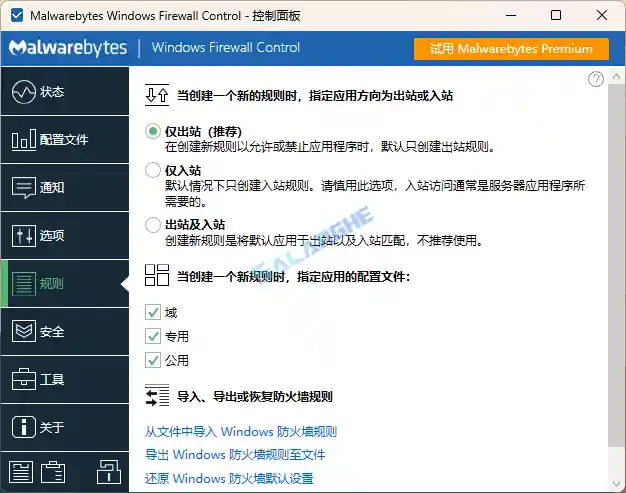
- 规则管理中心:集中查看、创建与编辑防火墙规则,提高管理效率。
- 应用授权控制:根据程序行为动态允许或阻止网络访问。
- 实时网络监控:展示当前连接与活动状态,便于识别异常流量。
- 通知系统:在应用尝试联网时即时提示用户做出决策。
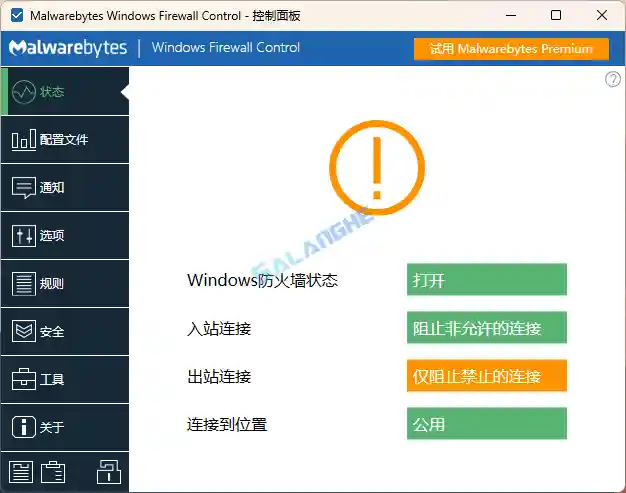
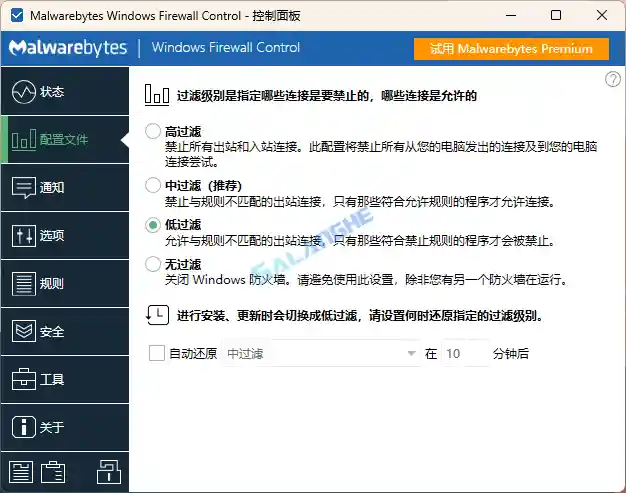
- 四种过滤模式:提供高安全、低干预等不同策略满足多类用户需求。
- 策略备份恢复:支持将配置导出并快速恢复,管理更安全稳妥。
- 日志记录分析:记录连接历史与规则命中情况,辅助判断安全策略。
- 增强安全模块:阻止未知程序或恶意软件绕过网络访问限制。
- 轻量后台运行:占用资源极低,不影响系统整体性能。
# 特点描述
- 默认简体中文及关闭自动更新;
- 程序关闭时清理右键菜单,随系统启动;
- 自动清理系统服务;