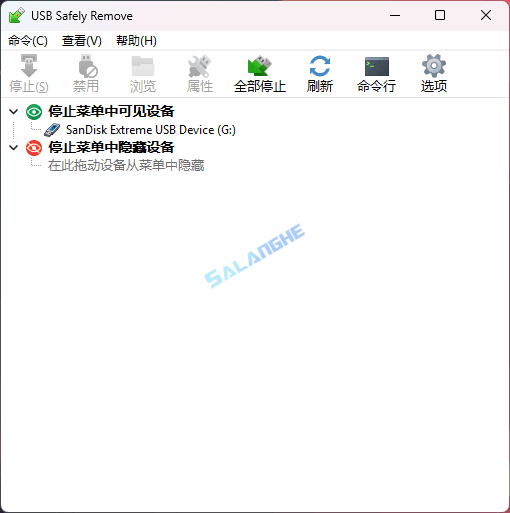
USB Safely Remove是一款专为Windows用户设计的USB设备管理工具,可在系统默认安全移除功能基础上提供更精确、更高效的设备控制体验。它能够准确定位并显示占用U盘、移动硬盘等外接设备的进程来源,并在需要时自动释放,从而避免因强制拔出导致的数据损坏风险。软件还支持自定义热键、自动弹出与设备命名管理,让频繁插拔USB设备的用户在日常使用中获得更高效率与更稳定的安全保障。
# 新版变化
https://safelyremove.com/allVersions.htm
USB Safely Remove 7.1 released! May 6th, 2025
Improvements
- Unable to stop dialog: ability to copy processes info to the clipboard added
- Additional debug information is sent in user bug reports when verbose logging is enabled (dump of all system devices and user settings)
- The ‘Display all storage devices’ option is now enabled by default
- Launching the program a second time brings the device menu to the front instead of the main dialog (consistent with the first launch behavior)
Bug fix
- ‘Drive Letters’ tab in the program settings could be grayed out and locked on Win 11
- Text in the troubleshoot service issues dialog was displayed incorrectly in English
- Some JPEG images caused program errors when set as device icons
- PNG images lost transparency when set as custom device icons
- Change device image dialog didn’t preserve its dimensions
- In some cases, the program might have prevented system shutdown
- (afterward, the program became unstable and might have displayed errors)
- Loading settings from file might not have worked correctly – some
- settings could get duplicated, e.g., autorun settings
- External storage devices without a drive letter weren’t displayed in the
- device menu by default (they appeared in the hidden devices section)
- The program might not detect or display certain types of storage devices
- Device names might not be detected for some devices
# 软件特点
- 能够比系统自带功能更准确地分析设备占用情况,减少无法弹出的困扰。
- 提供方便直观的设备列表与状态信息,使用户更清楚地了解当前连接设备。
- 支持高度自定义,包括热键、设备图标与自动弹出规则,使操作更便捷。
- 后台运行轻量不占资源,适合长期保持常驻提升设备管理效率。
# 功能特性
- 设备占用分析:自动检测并显示正在占用USB设备的具体进程来源。
- 一键释放进程:可在安全前提下强制释放占用,使设备能够顺利弹出。
- 自定义热键:支持为弹出指定设备设置快捷键,提高操作效率。
- 自动弹出功能:在任务执行完毕后自动移除设备,适合备份或传输流程。
- 设备重命名:允许用户自定义设备名称,方便快速识别多个USB设备。
- 设备图标管理:为每个外接设备设置不同图标,界面识别更直观。
- 安全弹出提示:确保所有数据写入完成后再执行移除动作,避免损坏。
- 多设备管理:可同时处理多个USB存储设备,适用于频繁插拔场景。
- 历史记录功能:保存设备使用记录,便于追踪使用情况与问题排查。
- 后台静默运行:占用极低系统资源,不影响日常电脑性能。
# 下载地址
USB Safely Remove v7.2.1.1330 Multilingual (2025/12/05)
https://safelyremove.com/assets/exe/usbsafelyremovesetup_7-2-1.exe
USB Safely Remove v7.x keygen/patch by DimitarSerg (2016/10/07)